| |

| LastActivityView v1.37
Copyright (c) 2012 - 2023 Nir Sofer
|
See Also
- TurnedOnTimesView - View the time/date ranges that your computer was turned on
- NK2Edit - Edit, merge and repair the AutoComplete files (.NK2) of Microsoft Outlook.
Description
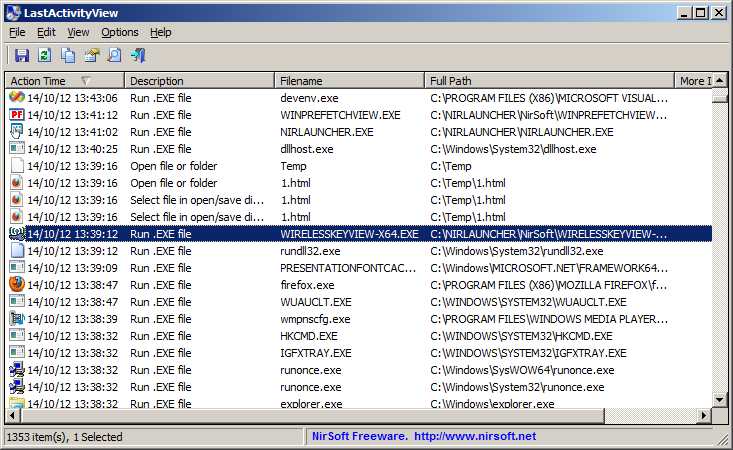
LastActivityView is a tool for Windows operating system that collects information from various sources on a running system,
and displays a log of actions made by the user and events occurred on this computer.
The activity displayed by LastActivityView includes: Running .exe file, Opening open/save dialog-box, Opening file/folder from Explorer or other software,
software installation, system shutdown/start, application or system crash, network connection/disconnection and more...
You can easily export this information into csv/tab-delimited/xml/html file or copy it to the clipboard and then paste into Excel or other software.
System Requirements
This utility works on any version of Windows, starting from Windows 2000 and up to Windows 11.
Both 32-bit and 64-bit systems are supported.
Known Limitations
This tool gathers information from various sources, including the Registry, the events log of Windows, the Prefetch folder of Windows (C:\windows\Prefetch), the MiniDump folder of Windows
(C:\Windows\Minidump), and more...
The accuracy and the availability of the information displayed by LastActivityView might be different from one system to another. For example, if the user or a software makes changes in the Registry,
the action time displayed by LastActivityView might be wrong, because it's based on the modified time of some Registry keys.
Also, for every type of action/event, there is some limitation according to the way that the information is saved in the system.
For example, the 'Select file in open/save dialog-box' action is limited for one action of every file extension, so if the user opened 2 .doc files with the open/save dialog-box, only the last one will be displayed.
Versions History
- Version 1.37:
- Fixed bug: LastActivityView crashed when trying to read empty or invalid Prefetch file.
- Version 1.36:
- Added 'Show Milliseconds In Time' option.
- Version 1.35:
- Added 'Data Source' column, which displays the Registry key or filename where the activity information was found.
- Added 'Add Header Line To CSV/Tab-Delimited File' option (Turned on by default).
- Version 1.32:
- Fix bug: On Windows 10/8 - In some folder names of 'View Folder in Explorer' items, LastActivityView omitted the first 2 characters.
- Version 1.31:
- Added 'Task Run' action, which is displayed when a task was executed by the 'Task Scheduler' of Windows. (Works on Windows Vista or later)
- Version 1.30:
- Added 'Quick Filter' feature (View -> Use Quick Filter or Ctrl+Q). When it's turned on, you can type a string in the text-box added under the toolbar and LastActivityView will instantly filter the actions list, showing only lines that contain the string you typed.
- Version 1.27:
- You can now choose whether to read the archive log files (Options -> Read Archive Log Files)
- Version 1.26:
- Version 1.25:
- LastActivityView now automatically reads archive log files (Archive-*.evtx) .
- Version 1.20:
- Added 'Wireless Network Connected' and 'Wireless Network Disconnected' actions (For Windows Vista and later).
This information is collected from Microsoft-Windows-WLAN-AutoConfig/Operational event log.
- Version 1.16:
- For 'Run .EXE file' actions, the version information of the .exe file is now displayed in the 'More Information' column.
- Version 1.15:
- Added option to show only the activity in the last xx seconds/minutes/hours/days (In 'Advanced Options' window).
- Version 1.12:
- You can now choose the desired encoding (ANSI, UTF-8, UTF-16) to save the csv/xml/text/html files. (Under the Options menu)
- Version 1.11:
- LastActivityView now uses the 8 date/time values stored in the Prefetch files of Windows 8 and Windows 10 ('Run .EXE file' action).
- Version 1.10:
- Fixed LastActivityView to detect the 'Run .EXE file' action on Windows 10.
- Version 1.09:
- Explorer context menu inside LastActivityView: When you right-click on a single item with a file or folder while holding down the shift key, LastActivityView now displays the context menu of Windows Explorer, instead of the LastActivityView context menu.
- Version 1.08:
- Fixed bug: LastActivityView failed to remember the last size/position of the main window if it was not located in the primary monitor.
- Version 1.07:
- Added 'Copy Files List' option.
- Added 'Open Folder In Explorer' option.
- Fixed to find the correct item when typing the string you want to search into the main List View.
- Version 1.06:
- Fixed to show properly the folder path of 'View Folder In Explorer' action on Windows 8.1 .
- Version 1.05:
- Added 'File Extension' column.
- Added secondary sorting support: You can now get a secondary sorting, by holding down the shift key while clicking the column header. Be aware that you only have to hold down the shift key when clicking the second/third/fourth column. To sort the first column you should not hold down the Shift key.
- Version 1.04:
- Fixed to display date/time properly according to daylight saving time settings.
- Version 1.03:
- Added secondary sorting: When clicking the 'Description' column header, the list is sorted by the Description, and then
by the 'Action time' column.
- Version 1.02:
- User information is now displayed for 'User Logoff' event.
- Fixed the flickering occurred while scrolling the actions/events list.
- Version 1.01:
- Added 'Mark Odd/Even Rows' option, under the View menu. When it's turned on, the odd and even rows are displayed in different color, to make it easier to read a single line.
- Version 1.00 - First release.
Start Using LastActivityView
LastActivityView doesn't require any installation process or additional dll files. In order to start using it,
simply run the executable file - LastActivityView.exe
After you run LastActivityView, it scans your computer and displays all actions and events found on your system.
You can select one or more items and then save them into xml/html/csv/tab-delimited file (Ctrl+S) or copy them to the clipboard (Ctrl+C), and then
paste the data to Excel or other software.
Actions/Events List
The following actions and events are currently supported by LastActivityView:
- Run .EXE file:
.EXE file run directly by the user, or by another software/service running in the background.
- Select file in open/save dialog-box:
The user selected the specified filename from the standard Save/Open dialog-box of Windows.
- Open file or folder:
The user opened the specified filename from Windows Explorer or from another software.
- View Folder in Explorer:
The user viewed the specified folder in Windows Explorer.
- Software Installation:
The specified software has been installed or updated.
- System Started:
The computer has been started.
- System Shutdown:
The system has been shut down, directly by the user, or by a software that initiated a reboot.
- Sleep:
The computer has been placed into sleep mode.
- Resumed from sleep:
The computer has been resumed from sleep mode.
- Network Connected:
Network connected, after previously disconnected.
- Network Disconnected:
Network has been disconnected
- Software Crash:
The specified software has been crashed.
- Software stopped responding (hang):
The specified software stopped responding.
- Blue Screen:
Blue screen event has been occurred on the system.
- User Logon:
The user logged on to the system.
- User Logoff:
The user logged off from the system. This even might caused by a software that initiated a reboot.
- Restore Point Created:
Restore point has been created by Windows operating system.
- Windows Installer Started
- Windows Installer Ended
- Wireless Network Connected:
Windows connected to a wireless network, the connection information is displayed in the 'More Information' column.
- Wireless Network Disconnected:
Windows disconnected from a wireless network, the connection information is displayed in the 'More Information' column.
How to delete the information displayed by LastActivityView...
Since the release of LastActivityView utility, many people contact me with the same question:
How do I delete the information displayed by LastActivityView ?
Unfortunately, there is no simple answer to this question because the information is collected from multiple sources, and currently
LastActivityView doesn't provide an option to automatically delete this information.
Also, some of the data collected by LastActivityView is essential to normal functioning of Windows operating system and deleting it may cause some problems.
In the following section, you can find the list of all sources that LastActivityView uses to collect the activity information and how to optionally delete them.
Be aware that deleting any data from your computer is on your own risk, and I cannot give any kind of support for people who want to recover data they deleted from their computer according to this article.
- Events log of Windows operating system:
The following events are taken from the Events log of Windows:
User Logon, User Logoff, Windows Installer Started, Windows Installer Ended, System Started, System Shutdown, Resumed from sleep,
Restore Point Created, Network Connected, Network Disconnected, Software Crash, Software stopped responding (hang)
Windows operating system doesn't allow you to delete individual items from the events log, but you can easily clear the entire events log.
In order to to clear the entire events log, simply go to Control Panel -> Administrative Tools -> Event Viewer , and then choose to clear (Action -> Clear All Events)
all major types of events logs (Application, Security, System...)
- Windows Prefetch Folder:
The Prefetch folder of Windows is usually located under C:\windows\Prefetch and
it's used by windows to optimize the performances of running applications.
Every time that you run an executable (.exe) file, .pf file is generated under this folder.
LastActivityView uses this folder for 'Run .EXE file' event.
In order to delete all 'Run .EXE file' events shown by LastActivityView, simply delete all .pf files under the Prefetch folder.
- Open/Save MRU list in the Registry:
Every time that you choose a filename in a standard open/save dialog-box of Windows, a new Registry entry is added under the following key:
On Windows XP and previous systems:
HKEY_CURRENT_USER\Software\Microsoft\Windows\CurrentVersion\Explorer\ComDlg32\OpenSaveMRU
On Windows 7/8/2008:
HKEY_CURRENT_USER\Software\Microsoft\Windows\CurrentVersion\Explorer\ComDlg32\OpenSavePidlMRU
LastActivityView uses the above Registry keys for the 'Select file in open/save dialog-box' event.
If you delete the entries under the above Registry keys (with RegEdit), Windows will not rememeber your last saved file/folder.
- Recent Folder:
Every time that you open a file, a new shortcut to this file is added to the recent folder of Windows,
located under C:\Documents and Settings\[User Profile]\Recent or C:\Users\[User Profile]\Recent
LastActivityView uses the recent folder of Windows to add the 'Open file or folder' event.
You can delete this type of event simply by deleting all shortcuts under the recent folder of Windows.
- Windows Shell Bags Regsitry key:
Windows Explorer remembers the settings (position, Size, columns position, and so on) or every folder you open by storing it under the following Registry keys:
HKEY_CURRENT_USER\Software\Microsoft\Windows\ShellNoRoam
HKEY_CURRENT_USER\Software\Microsoft\Windows\Shell
HKEY_CURRENT_USER\Software\Classes\Local Settings\Software\Microsoft\Windows\Shell
LastActivityView uses the above Registry keys to add the 'View Folder in Explorer' event.
If you delete the subkeys under the above Registry keys (With RegEdit), Windows will "forget" the settings of all folders.
- Software Uninstall Registry Key:
The 'Software Installation' event is taken from the following Registry keys:
HKEY_LOCAL_MACHINE\Software\Microsoft\Windows\CurrentVersion\Uninstall
HKEY_CURRENT_USER\Software\Microsoft\Windows\CurrentVersion\Uninstall
Warning !!!!
If you delete any Entry from these Registry keys, you'll not be able to uninstall the software in the future !
Command-Line Options
|
/stext <Filename>
| Save the actions and events list into a regular text file.
| |
/stab <Filename>
| Save the actions and events list into a tab-delimited text file.
| |
/scomma <Filename>
| Save the actions and events list into a comma-delimited text file (csv).
| |
/stabular <Filename>
| Save the actions and events list into a tabular text file.
| |
/shtml <Filename>
| Save the actions and events list into HTML file (Horizontal).
| |
/sverhtml <Filename>
| Save the actions and events list into HTML file (Vertical).
| |
/sxml <Filename>
| Save the actions and events list into XML file.
|
Translating LastActivityView to other languages
In order to translate LastActivityView to other language, follow the instructions below:
- Run LastActivityView with /savelangfile parameter:
LastActivityView.exe /savelangfile
A file named LastActivityView_lng.ini will be created in the folder of LastActivityView utility.
- Open the created language file in Notepad or in any other text editor.
- Translate all string entries to the desired language.
Optionally, you can also add your name and/or a link to your Web site.
(TranslatorName and TranslatorURL values) If you add this information, it'll be
used in the 'About' window.
- After you finish the translation, Run LastActivityView, and all translated
strings will be loaded from the language file.
If you want to run LastActivityView without the translation, simply rename the language file, or move
it to another folder.
License
This utility is released as freeware.
You are allowed to freely distribute this utility via floppy disk, CD-ROM,
Internet, or in any other way, as long as you don't charge anything for this and you don't
sell it or distribute it as a part of commercial product.
If you distribute this utility, you must include all files in
the distribution package, without any modification !
Disclaimer
The software is provided "AS IS" without any warranty, either expressed or implied,
including, but not limited to, the implied warranties of merchantability and fitness
for a particular purpose. The author will not be liable for any special, incidental,
consequential or indirect damages due to loss of data or any other reason.
Feedback
If you have any problem, suggestion, comment, or you found a bug in my utility,
you can send a message to nirsofer@yahoo.com
LastActivityView is also available in other languages. In order to change the language of
LastActivityView, download the appropriate language zip file, extract the 'lastactivityview_lng.ini',
and put it in the same folder that you Installed LastActivityView utility.
|
|