| |

| DNSDataView v1.76 - View the DNS records of specified domains
Copyright (c) 2008 - 2025 Nir Sofer
|
See Also
Description
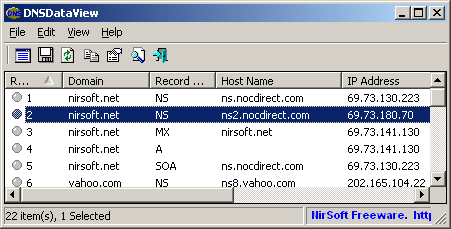
This utility is a GUI alternative to the NSLookup tool that comes with Windows operating system.
It allows you to easily retrieve the DNS records (MX, NS, A, SOA) of the specified domains.
You can use the default DNS server of your Internet connection, or use any other DNS server that you specify.
After retrieving the DNS records for the desired domains, you can save them into text/xml/html/csv file.
System Requirements
DNSDataView can work on Windows XP, Windows Server 2003, Windows Vista, Windows 7, Windows Server 2008, Windows 8, Windows 10, and Windows 11.
Older versions of Windows are not supported.
Versions History
- Version 1.76:
- Added new option to the 'DNS Record Types' section: DMARC. When you select this option, DNSDataView automatically adds the correct host name to the domain ( _dmarc) in order to get this record.
- Version 1.75:
- Added 'Load domains from file' option, which allows you to load the domains list from a text file, instead of pasting the domains into the text-box.
- Version 1.71:
- Fixed the refresh option to work properly when using the 'Load Windows DNS Cache' option.
- Version 1.70:
- Added new option: 'Get A record of every host name in PTR records'
- Version 1.65:
- Added /DomainsFile command-line option, which allows you to load the domains list from a file, for example:
DNSDataView.exe /DomainsFile "c:\temp\domains-list.txt" /scomma "c:\temp\domains-result.csv"
- Version 1.61:
- Fixed bug: DNSDataView failed to work properly with IDN domains (Internationalized domain name) of some european languages.
- Version 1.60:
- Version 1.56:
- Added /cfg command-line option to start DNSDataView with the specified config file.
- Version 1.55:
- You can now specify any variable inside DNSDataView.cfg as command-line option in order to modify the settings of DNSDataView, for example:
DNSDataView.exe /NSRecords 1 /ARecords 1 /AAAARecords 1 /TEXTRecords 0
- Version 1.50:
- Added command-line options to export the result directly into a file without any user interface, for example:
DNSDataView.exe /Domains "yahoo.com google.com" /scomma c:\temp\dns.csv
- Version 1.46:
- Fixed the domains text-box in 'Select Domains' window to handle Ctrl+A (Select All).
- Version 1.45:
- Added 'Automatically extract domains from URL' option. When it's turned on, you can enter a URL of a Web site, and DNSDataView will automatically extract the domain from the URL.
- Version 1.43:
- Fixed bug: When DNSDataView received multiple strings of TEXT DNS records, it displayed only the first one...
- Version 1.42:
- Added option to choose another font (name and size) to display in the main window.
- Version 1.41:
- Fixed the resizing problems of the 'Select Domains' window - some fields remained in their position instead of moving.
- DNSDataView now remembers that last size and position of the 'Select Domains' window.
- Fixed the tab order of the 'Select Domains' window.
- Version 1.40:
- Added 'Clear Windows DNS Cache' option, which allows you to easily clear the dns cache of Windows.
- Version 1.35:
- Added 'Load Windows DNS Cache' option, which displays the list of all DNS records stored in the DNS cache of
Windows.
- Version 1.31:
- Fixed DNSDataView to work also on Windows 2000.
- Version 1.30:
- Added 'Get a PTR record for every IP address' option.
When it's turned on, DNSDataView retrieves the PTR records of every IP address found in the other records.
- Version 1.26:
- When host name doesn't have IPv4 address, DNSDataView now retrieves its IPv6 address.
- Version 1.25:
- Added support for reverse DNS lookup (PTR records). You can now type
a valid IP address instead of domain name, and DNSDataView will
automatically make a reverse DNS lookup for the
specified IP address, by sending the right PTR request.
- Version 1.20:
- Added 'Section' column which displays Answer or Additional.
- Added option to fileter out additional records.
- Fixed the resize problem of the SRV check box.
- Version 1.15:
- Added support for IDN domains (Internationalized domain name).
When you type a domain name with non-English characters, DNSDataView
automatically converts it to its Ascii form and then submit it to the DNS server.
- Version 1.10:
- Added support for SRV records.
- Version 1.08:
- Fixed bug: DNSDataView stopped displaying the IP addresses after adding the error
information feature in v1.07.
- Version 1.07:
- Added new option : 'Show error information when DNS record cannot be retrieved'.
When this option is turned on, DNSDataView will show error number and message for
every DNS record that cannot be retrieved.
- Version 1.06:
- Added 'Add Header Line To CSV/Tab-Delimited File' option. When this option is turned on, the column names are added
as the first line when you export to csv or tab-delimited file.
- Versions 1.05:
- Added support for AAAA records (IPv6). This feature might not work on Windows XP without installed service packs.
- Versions 1.03:
- Fixed issue: DNSDataView failed to get A record of host name, when the 'NS' option was selected too.
- Versions 1.02:
- Added accelerator key for DNS Options window (F9).
- Versions 1.01:
- Fixed bug: On Multi-monitor systems, the 'Select Domains' window always opened in the middle of the 2 monitors.
- Versions 1.00 - First release.
Using DNSDataView
DNSDataView doesn't require any installation process or additional DLL files.
In order to start using it, simply run the executable file - DNSDataView.exe
After running it, you can type one or more domains that you wish to view their DNS information, and click 'Ok'.
After very short time, you should get all DNS records of the specified domains in the main window of DNSDataView.
If DNSDataView fails to retrieve the DNS records, you should try to manually type the DNS server of your
Internet provider.
Command-Line Options
|
/Domains <Domains List>
|
Specifies one or more domains to export their DNS information into text/html/xml file.
| |
/DomainsFile <Domains File>
|
Specifies a file that contains one or more domains to export their DNS information into text/html/xml file.
| |
/stext <Filename>
| Save the DNS records list into a simple text file.
| |
/stab <Filename>
| Save the DNS records list into a tab-delimited text file.
| |
/scomma <Filename>
| Save the DNS records list into a comma-delimited text file (csv).
| |
/stabular <Filename>
| Save the DNS records list into a tabular text file.
| |
/shtml <Filename>
| Save the DNS records list into HTML file (Horizontal).
| |
/sverhtml <Filename>
| Save the DNS records list into HTML file (Vertical).
| |
/sxml <Filename>
| Save the DNS records list into XML file.
| |
/cfg <Filename>
|
Start DNSDataView with the specified configuration file.
For example:
DNSDataView.exe /cfg "c:\config\ddv.cfg"
DNSDataView.exe /cfg "%AppData%\DNSDataView.cfg"
|
/ARecords <0 | 1>
/AAAARecords <0 | 1>
/CNAMERecords <0 | 1>
/MXRecords <0 | 1>
/SOARecords <0 | 1>
.
.
.
|
You can specify any variable inside DNSDataView.cfg as command-line option in order to modify the settings of DNSDataView, for example:
DNSDataView.exe /MXRecords 0 /ARecords 1 /AAAARecords 1 /SOARecords 0
|
Example:
DNSDataView.exe /Domains "yahoo.com google.com" /scomma c:\temp\dns.csv
Translating DNSDataView to other languages
In order to translate DNSDataView to other language, follow the instructions below:
- Run DNSDataView with /savelangfile parameter:
DNSDataView.exe /savelangfile
A file named DNSDataView_lng.ini will be created in the folder of DNSDataView utility.
- Open the created language file in Notepad or in any other text editor.
- Translate all string entries to the desired language.
Optionally, you can also add your name and/or a link to your Web site.
(TranslatorName and TranslatorURL values) If you add this information, it'll be
used in the 'About' window.
- After you finish the translation, Run DNSDataView, and all translated
strings will be loaded from the language file.
If you want to run DNSDataView without the translation, simply rename the language file, or move
it to another folder.
License
This utility is released as freeware.
You are allowed to freely distribute this utility via floppy disk, CD-ROM,
Internet, or in any other way, as long as you don't charge anything for this.
If you distribute this utility, you must include all files in
the distribution package, without any modification !
Disclaimer
The software is provided "AS IS" without any warranty, either expressed or implied,
including, but not limited to, the implied warranties of merchantability and fitness
for a particular purpose. The author will not be liable for any special, incidental,
consequential or indirect damages due to loss of data or any other reason.
Feedback
If you have any problem, suggestion, comment, or you found a bug in my utility,
you can send a message to nirsofer@yahoo.com
DNSDataView is also available in other languages. In order to change the language of
DNSDataView, download the appropriate language zip file, extract the 'dnsdataview_lng.ini',
and put it in the same folder that you Installed DNSDataView utility.
|
|