| |

| SniffPass v1.13 - Password Monitoring Software
Copyright (c) 2005 - 2012 Nir Sofer
|
Related Links
Search for other utilities in NirSoft
Description
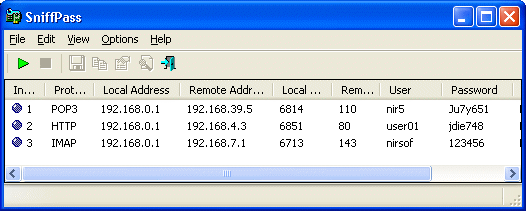
SniffPass is small password monitoring software that listens to your network, capture
the passwords that pass through your network adapter, and display them on the screen instantly.
SniffPass can capture the passwords of the following Protocols:
POP3, IMAP4, SMTP, FTP, and HTTP (basic authentication passwords).
You can use this utility to recover lost Web/FTP/Email passwords.
Versions History
- Version 1.13:
- Fixed bug: When opening the 'Capture Options' dialog-box after Network Monitor Driver 3.x was previously selected, SniffPass switched back to Raw Sockets mode.
- Version 1.12:
- Added 'Add Header Line To CSV/Tab-Delimited File' option. When this option is turned on, the column names are added as the first line when you export to csv or tab-delimited file.
- Removed the 'Refresh' menu item, which was not functional.
- Version 1.11:
- Added x64 version of SniffPass, to work with Microsoft Network Monitor Driver 3.x
on Windows x64.
- Version 1.10:
- Added support for capturing with Microsoft Network Monitor 3.x driver. (Very useful for Windows Vista/7 users, because the old Network Monitor driver is not supported in these OS)
- Added 'Promiscuous Mode' check-box for WinPCap and Microsoft Network Monitor 3.x driver.
- Version 1.07:
- Version 1.06:
- Under Vista, automatically run as administrator.
- Version 1.05:
- Fixed bug: The main window lost the focus when the user switched to another application and then returned back to SniffPass.
- Version 1.04:
- Added support for saving as comma delimited file.
- Version 1.03:
- The configuration is now saved to a file, instead of the Registry.
- Version 1.02:
- Added support for Microsoft Network Monitor driver (Under Windows 2000/XP).
- Version 1.01:
- Added new option: Import from tcpdump/libpcap file.
Allows you to view passwords stored in capture file created by Ethereal or by other capture program.
- When running SniffPass in the first time, the first found network adapter with IP address is
now automatically selected. (In previous version, the user had to select an adapter in order to start
capturing)
- Version 1.00 - First Release.
System Requirements
SniffPass can capture passwords on any 32-bit Windows operating system (Windows 98/ME/NT/2000/XP/2003/Vista)
as long as WinPcap capture driver is installed and works properly with your network adapter.
You can also use SniffPass with the capture driver of Microsoft Network Monitor, if it's installed on your system.
You can download and install the latest version of Microsoft Network Monitor from here.
Under Windows 2000/XP (or greater), SniffPass also allows you to capture TCP/IP packets
without installing any capture driver, by using 'Raw Sockets' method.
However, this capture method has the following limitation:
- On Windows XP/SP1 passwords cannot be captured at all -
Thanks to Microsoft's bug that appeared in SP1 update...
This bug was fixed on SP2 update, but under Vista,
Microsoft returned back the outgoing packets bug of XP/SP1.
- On Windows Vista with SP1, only UDP packets are captured.
TCP packets are not captured at all.
- On Windows 7, it seems that 'Raw Sockets' method works properly again, at least for now...
Using SniffPass
In order to start using SniffPass, follow the instructions below:
- Download and install
the WinPcap capture driver
or the Microsoft Network Monitor driver.
You can also try to capture without any driver installation, simply by using the 'Raw Socket' capture method,
but you should be aware that this method doesn't work properly in many systems.
- Run the executable file of SniffPass (SniffPass.exe).
- From the File menu, select "Start Capture", or simply click the green play button in the toolbar.
If it's the first time that you use SniffPass,
you'll be asked to select the capture method and the network adapter that you want to use.
After you select the desired capture options, SniffPass listen to your network adapter, and
display instantly any password that it find.
- In order to verify that the password sniffing works in your system,
go to the demo Web page at http://www.nirsoft.net/password_test and
type 'demo' as user name and 'password' as the password. After typing the user name/password and clicking 'Ok', you should see a new line in the main window
of SniffPass containing the user/password you typed.
Get passwords of another computer on your network ?
Many people ask me whether SniffPass is able to get passwords from another computer on the same network.
So here's the answer. In order to grab the passwords from other network computers:
- You must use a simple hub to connect your computers to the network.
All modern switches and routers automatically filter the packets of the other computers, so
the computer that runs SniffPass will never "see" the passwords of other computers when you use a switch or a router.
- Your network card must be able to enter into 'Promiscuous Mode'.
- You must use WinPCap or Network Monitor Driver as a capture method.
- For wireless network: Most wireless network cards (or their device drivers) automatically filter the packets of
other computers, so you won't be able the capture the passwords of other computers.
However, starting from Windows Vista/7, you can capture passwords of wireless networks that are not encrypted, by using
Wifi Monitor Mode and Network Monitor Driver 3.x.
For more information about capturing from wireless networks , read this Blog post:
How to capture data and passwords of unsecured wireless networks with SniffPass and SmartSniff
Command-Line Options
| /NoCapDriver
|
Starts SniffPass without loading the WinPcap Capture Driver.
|
| /NoReg
|
Starts SniffPass without loading/saving your settings to the Registry.
|
Translating SniffPass to other languages
SniffPass allows you to easily translate all menus, dialog-boxes, and other strings
to other languages.
In order to do that, follow the instructions below:
- Run SniffPass with /savelangfile parameter:
SniffPass.exe /savelangfile
A file named SniffPass_lng.ini will be created in the folder of SniffPass utility.
- Open the created language file in Notepad or in any other text editor.
- Translate all menus, dialog-boxes, and string entries to the desired language.
Optionally, you can also add your name and/or a link to your Web site. (TranslatorName and TranslatorURL values)
If you add this information, it'll be used in the 'About' window.
- After you finish the translation, Run SniffPass, and all translated
strings will be loaded from the language file.
If you want to run SniffPass without the translation, simply rename the language file, or move
it to another folder.
License
This utility is released as freeware.
You are allowed to freely distribute this utility via floppy disk, CD-ROM,
Internet, or in any other way, as long as you don't charge anything for this.
If you distribute this utility, you must include all files in
the distribution package, without any modification !
Disclaimer
The software is provided "AS IS" without any warranty, either expressed or implied,
including, but not limited to, the implied warranties of merchantability and fitness
for a particular purpose. The author will not be liable for any special, incidental,
consequential or indirect damages due to loss of data or any other reason.
Feedback
If you have any problem, suggestion, comment, or you found a bug in my utility,
you can send a message to nirsofer@yahoo.com
SniffPass is also available in other languages. In order to change the language of
SniffPass, download the appropriate language zip file, extract the 'sniffpass_lng.ini',
and put it in the same folder that you Installed SniffPass utility.
|
|