|
|
|
|
| |

| SpecialFoldersView v1.26 - Easily jump to special folders in Windows
Copyright (c) 2008 - 2016 Nir Sofer
|
See Also
- NK2Edit - Edit, merge and repair the AutoComplete files (.NK2) of Microsoft Outlook.
Description
Windows operating system have dozens of special folders that are used for
storing application settings and files, storing Internet files, saving temporary files, storing shortcuts to other files, and so on.
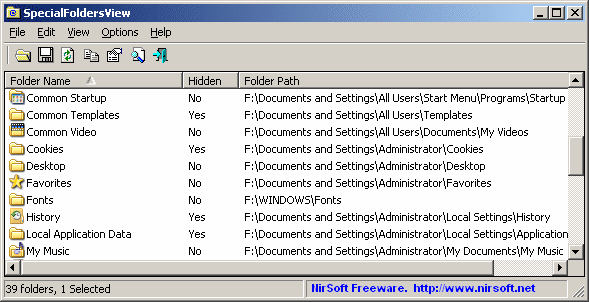
This utility displays the list of all special folders in your system, and allows you to easily
jump to the right folder simply by double-clicking the folder item.
You can also save the list of all folder paths into text/html/xml file.
System Requirements
This utility works on Windows 2000, Windows XP, Windows Server 2003, Windows Server 2008, Windows Vista, Windows 7, Windows 8, and Windows 10.
Both 32-bit and 64-bit systems are supported.
There is also a separated non-unicode download for Windows 98/ME.
Versions History
- Version 1.26:
- Added 'Copy Environment String Path'.
- Version 1.25:
- Added 'Environment String Path' column, which displays the folder path using environment variables, like %USERPROFILE% , %APPDATA%.
- Version 1.21:
- Added support for 'Downloads' folder. (Windows 7 and Windows 8)
- Version 1.20:
- Added support for 3 folders on 64-bit systems: Program Files x86, Program Files - Common x86, and System Directory x86.
(Works only on the x64 build)
- Added 'Mark Odd/Even Rows' option, under the View menu. When it's turned on, the odd and even rows are displayed in different color, to make it easier to read a single line.
- Fixed issue: The properties dialog-box and other windows opened in the wrong monitor, on multi-monitors system.
- Version 1.15 - Added support for 'Quick Launch' folder.
- Version 1.14 - Fixed issue: Removed the wrong encoding from the xml string, which caused problems to some xml viewers.
- Version 1.13 - Fixed the icons problem on Windows 7/x64.
- Version 1.12 - Added sorting command-line options, and the documentation for command-line options
that was missed in the previous versions.
- Version 1.11 - Added 'Read Only' and 'System' attributes. Also Added a separated version for x64 systems.
- Version 1.10 - Added 'Folder Properties' option, and 'My Documents' folder that I missed in the previous versions.
- Version 1.05 - Added 'CSIDL Name' column.
- Version 1.04 - Add CSIDL (Folder ID) of each folder.
- Version 1.03 - Added option to select another font.
- Version 1.02 - New options: Create shortcuts on dekstop.
- Version 1.01 - When saving as HTML, the folder paths are created as links.
- Version 1.00 - First release.
Using SpecialFoldersView
SpecialFoldersView doesn't require any installation process or additional DLL files.
In order to start using it, simply run the executable file - SpecialFoldersView.exe
The main window of SpecialFoldersView displays the list of all special folders in your system.
In order to open the desired folder in Explorer, simply double-click the desired folder item.
Special Folders List Sample
In the following example, you can find the list of all special folders in typical installation of Windows XP with 'Administrator' user.
This list was created by using SpecialFoldersView:
| Folder Name
| Folder Path
| CSIDL
| CSIDL Name
| | Application Data | C:\Documents and Settings\Administrator\Application Data | 0x1a | CSIDL_APPDATA
| | CD Burning | C:\Documents and Settings\Administrator\Local Settings\Application Data\Microsoft\CD Burning | 0x3b | CSIDL_CDBURN_AREA
| | Common Administrative Tools | C:\Documents and Settings\All Users\Start Menu\Programs\Administrative Tools | 0x2f | CSIDL_COMMON_ADMINTOOLS
| | Common Application Data | C:\Documents and Settings\All Users\Application Data | 0x23 | CSIDL_COMMON_APPDATA
| | Common Desktop | C:\Documents and Settings\All Users\Desktop | 0x19 | CSIDL_COMMON_DESKTOPDIRECTORY
| | Common Documents | C:\Documents and Settings\All Users\Documents | 0x2e | CSIDL_COMMON_DOCUMENTS
| | Common Favorites | C:\Documents and Settings\All Users\Favorites | 0x1f | CSIDL_COMMON_FAVORITES
| | Common Music | C:\Documents and Settings\All Users\Documents\My Music | 0x35 | CSIDL_COMMON_MUSIC
| | Common Pictures | C:\Documents and Settings\All Users\Documents\My Pictures | 0x36 | CSIDL_COMMON_PICTURES
| | Common Start Menu | C:\Documents and Settings\All Users\Start Menu | 0x16 | CSIDL_COMMON_STARTMENU
| | Common Start Menu Programs | C:\Documents and Settings\All Users\Start Menu\Programs | 0x17 | CSIDL_COMMON_PROGRAMS
| | Common Startup | C:\Documents and Settings\All Users\Start Menu\Programs\Startup | 0x18 | CSIDL_COMMON_STARTUP
| | Common Templates | C:\Documents and Settings\All Users\Templates | 0x2d | CSIDL_COMMON_TEMPLATES
| | Common Video | C:\Documents and Settings\All Users\Documents\My Videos | 0x37 | CSIDL_COMMON_VIDEO
| | Cookies | C:\Documents and Settings\Administrator\Cookies | 0x21 | CSIDL_COOKIES
| | Desktop | C:\Documents and Settings\Administrator\Desktop | 0x10 | CSIDL_DESKTOPDIRECTORY
| | Favorites | C:\Documents and Settings\Administrator\Favorites | 0x06 | CSIDL_FAVORITES
| | Fonts | C:\WINDOWS\Fonts | 0x14 | CSIDL_FONTS
| | History | C:\Documents and Settings\Administrator\Local Settings\History | 0x22 | CSIDL_HISTORY
| | Local Application Data | C:\Documents and Settings\Administrator\Local Settings\Application Data | 0x1c | CSIDL_LOCAL_APPDATA
| | My Documents | C:\Documents and Settings\Administrator\My Documents | 0x05 | CSIDL_PERSONAL
| | My Music | C:\Documents and Settings\Administrator\My Documents\My Music | 0x0d | CSIDL_MYMUSIC
| | My Pictures | C:\Documents and Settings\Administrator\My Documents\My Pictures | 0x27 | CSIDL_MYPICTURES
| | NetHood | C:\Documents and Settings\Administrator\NetHood | 0x13 | CSIDL_NETHOOD
| | PrintHood | C:\Documents and Settings\Administrator\PrintHood | 0x1b | CSIDL_PRINTHOOD
| | Profile Folder | C:\Documents and Settings\Administrator | 0x28 | CSIDL_PROFILE
| | Program Files | C:\Program Files | 0x26 | CSIDL_PROGRAM_FILES
| | Program Files - Common | C:\Program Files\Common Files | 0x2b | CSIDL_PROGRAM_FILES_COMMON
| | Recent | C:\Documents and Settings\Administrator\Recent | 0x08 | CSIDL_RECENT
| | Send To | C:\Documents and Settings\Administrator\SendTo | 0x09 | CSIDL_SENDTO
| | Start Menu | C:\Documents and Settings\Administrator\Start Menu | 0x0b | CSIDL_STARTMENU
| | Start Menu Programs | C:\Documents and Settings\Administrator\Start Menu\Programs | 0x02 | CSIDL_PROGRAMS
| | Startup | C:\Documents and Settings\Administrator\Start Menu\Programs\Startup | 0x07 | CSIDL_STARTUP
| | System Directory | C:\WINDOWS\system32 | 0x25 | CSIDL_SYSTEM
| | Templates | C:\Documents and Settings\Administrator\Templates | 0x15 | CSIDL_TEMPLATES
| | Temporary Folder | C:\Documents and Settings\Administrator\Local Settings\Temp\ | |
| | Temporary Internet Files | C:\Documents and Settings\Administrator\Local Settings\Temporary Internet Files | 0x20 | CSIDL_INTERNET_CACHE
| | Windows Directory | C:\WINDOWS | 0x24 | CSIDL_WINDOWS
|
Command-Line Options
|
/stext <Filename>
| Save the list of all special folders into a regular text file.
| |
/stab <Filename>
| Save the list of all special folders into a tab-delimited text file.
| |
/scomma <Filename>
| Save the list of all special folders into a comma-delimited text file (csv).
| |
/stabular <Filename>
| Save the list of all special folders into a tabular text file.
| |
/shtml <Filename>
| Save the list of all special folders into HTML file (Horizontal).
| |
/sverhtml <Filename>
| Save the list of all special folders into HTML file (Vertical).
| |
/sxml <Filename>
| Save the list of all special folders to XML file.
| |
/sort <column>
|
This command-line option can be used with other save options for sorting by the desired column.
If you don't specify this option, the list is sorted according to the last sort that you made from the user interface.
The <column> parameter can specify the column index (0 for the first column, 1 for the second column, and so on) or
the name of the column, like "Folder Name" and "Folder Path".
You can specify the '~' prefix character (e.g: "~Folder Name") if you want to sort in descending order.
You can put multiple /sort in the command-line if you want to sort by multiple columns.
Examples:
SpecialFoldersView.exe /shtml "f:\temp\folders.html" /sort 2 /sort ~1
SpecialFoldersView.exe /shtml "f:\temp\folders.html" /sort "Type" /sort "Name"
| |
/nosort
|
When you specify this command-line option, the list will be saved without any sorting.
|
Translating SpecialFoldersView to other languages
In order to translate SpecialFoldersView to other language, follow the instructions below:
- Run SpecialFoldersView with /savelangfile parameter:
SpecialFoldersView.exe /savelangfile
A file named SpecialFoldersView_lng.ini will be created in the folder of SpecialFoldersView utility.
- Open the created language file in Notepad or in any other text editor.
- Translate all string entries to the desired language.
Optionally, you can also add your name and/or a link to your Web site.
(TranslatorName and TranslatorURL values) If you add this information, it'll be
used in the 'About' window.
- After you finish the translation, Run SpecialFoldersView, and all translated
strings will be loaded from the language file.
If you want to run SpecialFoldersView without the translation, simply rename the language file, or move
it to another folder.
License
This utility is released as freeware.
You are allowed to freely distribute this utility via floppy disk, CD-ROM,
Internet, or in any other way, as long as you don't charge anything for this.
If you distribute this utility, you must include all files in
the distribution package, without any modification !
Disclaimer
The software is provided "AS IS" without any warranty, either expressed or implied,
including, but not limited to, the implied warranties of merchantability and fitness
for a particular purpose. The author will not be liable for any special, incidental,
consequential or indirect damages due to loss of data or any other reason.
Feedback
If you have any problem, suggestion, comment, or you found a bug in my utility,
you can send a message to nirsofer@yahoo.com
SpecialFoldersView is also available in other languages. In order to change the language of
SpecialFoldersView, download the appropriate language zip file, extract the 'specialfoldersview_lng.ini',
and put it in the same folder that you Installed SpecialFoldersView utility.
|
|
|