| |

| WirelessNetView v1.75 - Wireless Network Monitoring Tool
Copyright (c) 2008 - 2017 Nir Sofer
|
See Also
Description
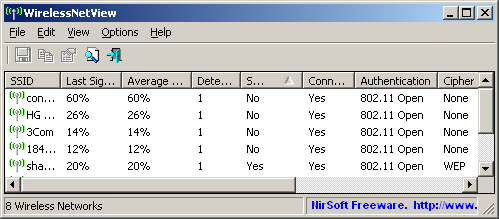
WirelessNetView is a small utility that runs in the background, and monitor the activity of wireless networks around you.
For each detected network, it displays the following information:
SSID, Last Signal Quality, Average Signal Quality, Detection Counter, Authentication Algorithm, Cipher Algorithm, MAC Address, RSSI, Channel Frequency, Channel Number, and more.
System Requirements
- Wireless network adapter and wireless card driver that works with the built-in wireless support of Windows XP/Vista/7/2008.
If you don't have a compatible wireless adapter and driver, "cannot find wireless adapter" error will be displayed.
- Windows 10, Windows 8, Windows 7, Windows Vista, Windows Server 2008, or Windows XP with SP2/SP3.
For Windows XP with SP2, it's recommended to install the KB918997 update.
To download this update, click here.
Known Issues
- 'Maximum Speed' and 'PHY Types' columns display incorrect values on Windows XP.
Search for other utilities in NirSoft
Versions History
- Version 1.75:
- Added 'MAC Addresses List' option (Ctrl+F8), which allows you to create a list of MAC addresses and their description.
The description specified in this list will be displayed under the 'Description' column.
The MAC addresses list is saved in 'WirelessNetView_MAC_List.txt' located in the same folder of WirelessNetView.exe
- Version 1.72:
- The connection name is now displayed in the adapters list of 'Advanced Options' window.
- Version 1.71:
- Fixed WirelessNetView to ignore false items with 00-00-00-00-00-00 MAC address.
- Version 1.70:
- Added SHA-256 digital signature, in order to avoid from 'signature is corrupt or invalid' error message on Windows 7 or later.
- Version 1.69:
- Version 1.68:
- Added 'Auto Size Columns On Update' option.
- Version 1.67:
- Fixed WirelessNetView to detect and calculate the maximum speed of 802.11ac networks (On Windows Vista or later).
- Version 1.66:
- WirelessNetView now displays 'Cannot find wireless adapter !' message in the bottom status bar when there is no wireless adapter...
- Version 1.65:
- Added 'Connect' option (supported only on Windows Vista/7/8 or later), which tries to connect the selected wireless network.
- Version 1.61:
- Added accelerator keys to the Update Rate menu.
- Version 1.60:
- Fixed bug: WirelessNetView failed to remember the last size/position of the main window if it was not located in the primary monitor.
- Version 1.59:
- Added 'Always On Top' option.
- Version 1.58:
- Added secondary sorting support: You can now get a secondary sorting, by holding down the shift key while clicking the column header. Be aware that you only have to hold down the shift key when clicking the second/third/fourth column. To sort the first column you should not hold down the Shift key.
- Version 1.57:
- Added 'Force Negative RSSI' option. Some wireless adapters or drivers under Windows XP, randomly returns positive RSSI value instead of negative number.
If you check this option, WirelessNetView will automatically turn the positive RSSI value to nagative in order to fix this problem.
- Version 1.56:
- Fixed issue: On a wireless network with multiple access points, WirelessNetView displayed all access points as connected.
- Version 1.55:
- Added 'Advanced Options' window (F9), which allows you to choose the wireless network adapter that will be used to scan the wireless networks. This option is useful if you have multiple wireless network adapters.
- Version 1.50:
- Added 'BSS Type' column - Infrastructure or Ad-Hoc.
- Version 1.46:
- Fixed the flickering problem on Windows 7.
- Version 1.45:
- Added 'Auto Size Columns+Headers' option, which allows you to automatically resize the columns according to the row values and column headers.
- Fixed bug: WirelessNetView failed to load the external MAC addresses file (oui.txt) when every line has 2 leading space characters. (Sometimes this file is provided with leading space characters, I don't really know why...)
- Version 1.43:
- Added 'MAC Address Format' option: XX-XX-XX-XX-XX-XX , XX:XX:XX:XX:XX:XX , or XXXXXXXXXXXX
- Version 1.42:
- Added 'Connected' column, which shows whether you are connected to this network.
- Version 1.41:
- The 'Maximum Speed' column now displays the correct speed of 802.11n networks (Only on Windows 7/Vista/2008)
- The 'PHY Types' columns now displays whether the network is 802.11g or 802.11n (Only on Windows 7/Vista/2008)
- Version 1.40:
- Added 'Start As Hidden' option. When this option and 'Put Icon On Tray' option are turned on, the main window of WirelessNetView
will be invisible on start.
- Version 1.38:
- Added '% Detection' column.
- Version 1.37:
- Added 'Mark Odd/Even Rows' option, under the View menu. When it's turned on, the odd and even rows are displayed in different color, to make it easier to read a single line.
- Version 1.36:
- Added 'Mark The Best Secured Network To Connect' option.
- Version 1.35:
- Added 'Network Security Filter' option (under the Options menu), which allows you to choose
to display only secured networks, only unsecured networks, or both.
- Version 1.30:
- Added 'Clear Networks List' option which allows you to clear the accumulated wireless networks list.
- Version 1.27:
- Added 'Add Header Line To CSV/Tab-Delimited File' option. When this option is turned on, the column names are added
as the first line when you export to csv or tab-delimited file.
- Version 1.26:
- Added /sort command-line option.
- Version 1.25:
- Added 'Very High' update rate.
- Added command-line options to save the current detected wireless networks to text/html/csv/xml file.
- Version 1.22:
- Fixed issue: When WirelessNetView window is hidden and there is an icon in the taskbar, running WirelessNetView again will open the existing
instance of WirelessNetView, instead of creating another one.
- Version 1.21:
- Added 'Maximum Speed' column.
- Version 1.20:
- Added 'Restart Windows Wireless Service' (Ctrl+R) option. Sometimes, the wireless service of Windows XP stop working from
unknown reason or it's stopped by another wireless network software. This option allows you to easily restart the sevice when
something goes wrong.
- Fixed bug: When plugging a Wi-Fi USB adapter while WirelessNetView is already running, WirelessNetView couldn't detect any network, and you had the close and run it again in order to get it work.
- Version 1.16:
- Fixed bug: WirelessNetView created XML with invalid characters.
- Version 1.15:
- Fixed issue: When WirelessNetView detect more than one network with the same SSID, it'll be dispalyed as a separated item.
- Version 1.12:
- New option: Beep On New Network.
- Version 1.11:
- Added update rate (low/medium/high).
- Version 1.10:
- Added new columns: MAC Address, RSSI, Channel Frequency, and Channel Number.
- Add 'Company Name' column that display the company name according to the MAC address (Requires to download an external file, see below).
- WirelessNetView now can also work without KB918997 update, although when this update is not installed, some of the column values won't be displayed.
- Version 1.03:
- Added new option: Put Icon On Tray.
- Version 1.02:
- New option: Mark The Best Network To Connect - Mark the network with the highest signal value
that doesn't require a network key.
- Added 'PHY Types' column.
- Version 1.01:
- Added support for saving as comma-delimited text file.
- Fixed bug: The main window lost the focus when the user switched to another application and then returned back to WirelessNetView.
- Version 1.00: First release.
Using WirelessNetView
In order to start using WirelessNetView, simply run the executable file - WirelessNetView.exe
After running it, the main window displays the list of all wireless networks detected on your area.
The list is automatically updated every 10 seconds, so you can see the changes in networks signal.
Also, if new wireless networks are detected, they'll be added to the list.
The 'Company Name' Column
Starting from version 1.10, WirelessNetView allows you to view the company name of each wireless device.
The company name is determined according to the MAC address.
However, in order to get this feature, you must download the following external file, and put in the same folder
of WirelessNetView.exe: http://standards-oui.ieee.org/oui/oui.txt
Be aware that you must save it as 'oui.txt'
Translating WirelessNetView to other languages
In order to translate WirelessNetView to other language, follow the instructions below:
- Run WirelessNetView with /savelangfile parameter:
WirelessNetView.exe /savelangfile
A file named WirelessNetView_lng.ini will be created in the folder of WirelessNetView utility.
- Open the created language file in Notepad or in any other text editor.
- Translate all string entries to the desired language.
Optionally, you can also add your name and/or a link to your Web site.
(TranslatorName and TranslatorURL values) If you add this information, it'll be
used in the 'About' window.
- After you finish the translation, Run WirelessNetView, and all translated
strings will be loaded from the language file.
If you want to run WirelessNetView without the translation, simply rename the language file, or move
it to another folder.
Command-Line Options
|
/stext <Filename>
| Save the list of wireless networks into a regular text file.
| |
/stab <Filename>
| Save the list of wireless networks into a tab-delimited text file.
| |
/scomma <Filename>
| Save the list of wireless networks into a comma-delimited text file (csv).
| |
/stabular <Filename>
| Save the list of wireless networks into a tabular text file.
| |
/shtml <Filename>
| Save the list of wireless networks into HTML file (Horizontal).
| |
/sverhtml <Filename>
| Save the list of wireless networks into HTML file (Vertical).
| |
/sxml <Filename>
| Save the list of wireless networks into XML file.
| |
/sort <column>
|
This command-line option can be used with other save options for sorting by the desired column.
If you don't specify this option, the list is sorted according to the last sort that you made from the user interface.
The <column> parameter can specify the column index (0 for the first column, 1 for the second column, and so on) or
the name of the column, like "SSID" and "Last Signal".
You can specify the '~' prefix character (e.g: "~SSID") if you want to sort in descending order.
You can put multiple /sort in the command-line if you want to sort by multiple columns.
Examples:
WirelessNetView.exe /shtml "f:\temp\wireless.html" /sort 2 /sort ~1
WirelessNetView.exe /shtml "f:\temp\wireless.html" /sort "~Security Enabled" /sort "SSID"
| |
/nosort
|
When you specify this command-line option, the list will be saved without any sorting.
|
License
This utility is released as freeware.
You are allowed to freely distribute this utility via floppy disk, CD-ROM,
Internet, or in any other way, as long as you don't charge anything for this.
If you distribute this utility, you must include all files in
the distribution package, without any modification !
Disclaimer
The software is provided "AS IS" without any warranty, either expressed or implied,
including, but not limited to, the implied warranties of merchantability and fitness
for a particular purpose. The author will not be liable for any special, incidental,
consequential or indirect damages due to loss of data or any other reason.
Feedback
If you have any problem, suggestion, comment, or you found a bug in my utility,
you can send a message to nirsofer@yahoo.com
WirelessNetView is also available in other languages. In order to change the language of
WirelessNetView, download the appropriate language zip file, extract the 'wirelessnetview_lng.ini',
and put it in the same folder that you Installed WirelessNetView utility.
|
|