| |

| PingInfoView v3.20 - Ping monitor utility
Copyright (c) 2008 - 2025 Nir Sofer
|
See Also
Description
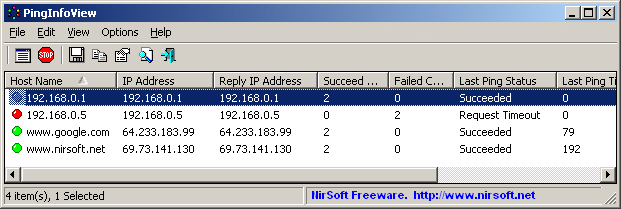
PingInfoView is a small utility that allows you to easily ping multiple host names and IP addresses, and
watch the result in one table.
It automatically ping to all hosts every number of seconds that you specify, and displays the number of succeed and failed pings, as well
as the average ping time.
You can also save the ping result into text/html/xml file, or copy it to the clipboard.
PingInfoView supports both ICMP pings and TCP pings.
System Requirements
This utility works under Windows 2000, Windows XP, Windows Server 2003, Windows Server 2008, Windows Server 2012, Windows Server 2016, Windows Vista, Windows 7, Windows 8, Windows 10, and Windows 11.
Older versions of Windows are not supported.
Versions History
- Version 3.20
- Added 'Black Background' option (Under the View menu). When it's turned on, the main tables are displayed in black background and white text, instead of default system colors.
- Added 'Mark Odd/Even Rows' option.
- Version 3.15
- Fixed bug from version 3.10 that caused improper parsing of IPv6 addresses.
- Custom context menu: You can now add your own menu items to the right-click context menu of the upper pane, by editing the configuration file (PingInfoView.cfg)
- See the 'Custom Context Menu' section for more information.
- Version 3.10
- Added support for IPv6 TCP pings. You can specify host name (For example: www.google.com:80), or IPv6 address in the following format: [IPv6 Address]:Port.
- Version 3.05
- Added 'Source IPv4 Address' option. You can use this option if you have multiple network adapters and you want to send the ping from specific adapter.
- Version 3.01
- Fixed bug: when disabling one or more items, the ping interval was longer than the interval in the Ping Options window.
- Version 3.00
- Added support for IPv6 pings. In order to enable IPv6 pings you have to select the 'Allow IPv6 addresses' option.
- Optionally, you can choose the source IPv6 address (It might be needed if you have multiple network adapters)
- Be aware that TCP pings are not supported for IPv6 in this version.
- When you specify host name and the 'Allow IPv6 addresses' option is selected, PingInfoView first tries to resolve the host name as IPv6 address, and if it fails, it resolves the host name as IPv4 address.
- Added option to change the sorting column from the menu (View -> Sort By).
- Added 'Sort By' button to the toolbar.
- Added 'Update Settings' button to the 'Ping Options' window, which allows you to change some ping settings (e.g. : number of seconds to wait between the pings, ping timeout, window title) without resetting all ping data. You can also update the description of existing items, add new items, or change the groups.
- Added 'Copy Stuck Threads Report' (Under Help menu) for debugging stuck threads problem.
- The status bar now shows the number of active ping threads, and the number of stuck threads in parenthesis.
- Fixed bug with stuck threads that occurred when PingInfoView failed to resolve host name.
- Version 2.30
- Added 'High Resolution Ping Time' option (Under the Options menu). When it's turned on, PingInfoView displays the ping time in microsecond resolution (For example: 2.351 ).
- Added 'Hide Disabled Items' option (Under the View menu).
- Version 2.25
- Added option to disable and enable the selected items. When an item is disabled, PingInfoView will not sent pings to this host until it's enabled.
- Be aware that the disable status is not remembered if you exit from PingInfoView and then run it again.
- Version 2.22
- The number of items in a group is now displayed in the group title.
- Version 2.21
- Added 'Copy Clicked Cell' option to the right-click context menu, which copies to the clipboard the text of cell that you right-clicked with the mouse.
- Version 2.20
- When the 'Use IP-Host Description format' option is turned on, you can now specify group name for every group of computers.
- When group name is specified, every group is displayed separately, and you can collapse and expand a group by double-clicking the group header.
- Look at the 'Use IP-Host Description format' section for an example of using this new groups feature.
- Added 'Skip the first address' and 'Skip the last address' options for IP addresses range in CIDR format.
- Version 2.16
- Fixed the 'Execute the following command on success ping (After previous failure)' option (Added in version 2.15) to work according to the 'Number of consecutive failed pings to trigger the failed command/sound alert' option.
For example: if you set the 'Number of consecutive failed pings...' value to 3, and there are 2 failed pings and then a success ping, PingInfoView will not activate the success command.
- Version 2.15
- Added new option: 'Execute the following command on success ping (After previous failure)' (In 'Advanced Options' window).
- Updated to work properly in high DPI mode.
- Version 2.10
- Added new lower pane mode: 'Add ping line for every change in ping status'. When you choose this mode, a new ping line is added to the lower pane only when there
is a change in the ping status.
- For example: if you have a sequence of 10 succeeded pings and then a sequence of 5 failed pings, you'll see 2 lines in the lower pane -
one line for the 10 succeeded pings and one line for the 5 failed pings.
- The new 'Pings Count' column displays the number of failed/succeeded pings. The 'Sent On' column displays the time range of the succeeded/failed pings.
- Version 2.05
- Added 'Display Mode' option (Under the Options menu), which allows you to view only the hosts with succeeded pings or to view only the hosts with failed pings.
- Added 'Add Header Line To CSV/Tab-Delimited File' option (Turned on by default).
- Version 2.02
- Added new column: 'Total Sent Pings'.
- Version 2.01
- Added 'Start As Hidden' option (Enabled only when 'Put Icon On Tray' option is on).
- When both 'Start As Hidden' and 'Put Icon On Tray' options are turned on - PingInfoView starts to ping instantly when you run it without displaying the main window.
- Version 2.00
- Added support for TCP pings. You can now specify the host name or IP address with a port number (e.g: 192.168.0.100:80 192.168.1.10:443 www.nirsoft.net:443 ) and
PingInfoView will check the TCP connection in the specified port number instead of using ICMP pings.
- Version 1.86
- Added option to specify IP addresses range in CIDR format (e.g: 192.168.0.0/24)
- Added option to choose another font (name and size) to display in the main window.
- Version 1.85
- Added IP options: Time To Live and Don't Fragment.
- Version 1.82
- Fixed to sort properly the 'Last Succeed On' and 'Last Failed On' columns.
- Version 1.81
- Fixed bug with resizing the 'Ping Options' window.
- Version 1.80
- Added new option: Beep On Succeeded Pings (After Failure).
- Fixed bug: When the lower pane option was turned off, PingInfoView didn't add the pings to the log file.
- Version 1.75
- Added 'Resolve host name to IP address on every ping' option. If the IP address of the host you ping may change, you should turn on this option , so when
the IP address is changed, PingInfoView will ping the new IP address.
- Added new option in 'Advanced Options' window: 'Limit the total number of accumulated pings' (Default is 50000).
If you run PingInfoView for long period of time, you should use this option.
Otherwise, the accumuated ping result will consume a lot of memory, and eventually PingInfoView will respond very slowly or crash.
- Added 'Window Title' field. The text you type here will appear in the title of the main window.
- Version 1.70
- Automatic export feature: You can now choose to generate a new filename on every session (When you close the program and then run it again) or on every save. You can also generate a filename with date/time (e.g: ping20170925112130.csv) instead of numeric counter.
- Version 1.65
- The 'Consecutive Failed Count' column now keeps the last value when pings are ok again.
- Added 'Max Consecutive Failed Count' column which displays the maximum number of consecutive failed pings and 'Max Consecutive Failed Time' which displays the date/time that
the maximum number of consecutive failed pings was detected.
- Added 'Add only failed pings' option to the 'Lower Pane Mode' in 'Advanced Options' window.
- Version 1.60
- Added option to automatically export the current pings status to a file (csv/tab-delimited/html/xml) every xx seconds (In 'Advanced Options' window).
- Added option to execute a command on ping failure.
- Added option to specify the number of consecutive failed pings to trigger the sound/beep alert and the failed command executaion.
- Added 'Consecutive Failed Count' column.
- Version 1.55
- Added option to choose the type of beep/sound to use when a ping fails (In 'Advanced Options' window).
- Added option to add all ping results or only the failed pings into a comma-delimited or tab-delimited log file (In 'Advanced Options' window).
- Added option to stop adding the ping results into the lower pane (In 'Advanced Options' window).
It's recommended to use this option if you have large amount of pings, because the accumulation of ping results consumes a lot of memory and
eventually causes PingInfoView to crash.
- When 'Use IP-Host Description format' option is turned on, PingInfoView now adds the IP address even if it doesn't have a description.
- Version 1.51
- On IP-Host format, if you put '#' in the beginning of the line, PingInfoView will consider it as a remark line and ignore it.
- Version 1.50
- Added option to specify the ping size (The default is 32 bytes).
- Added 'Order' column, which specifies the original order of hosts, as you typed in the 'Ping Options' window.
- Version 1.45
- Added option to control the maximum number of concurrent pings (In 'Advanced Options' window - F9). The default value is 500.
- Fixed bug: PingInfoView failed to remember the last size/position of the main window if it was not located in the primary monitor.
- Version 1.43
- Fixed bug: When using PingInfoView from command-line, /IPHostDescFormat and some other command-line options failed to work properly.
- Version 1.42
- Fixed issue: When editing PingInfoView_hosts.txt with external editor that adds Byte order mark to the file, PingInfoView failed to
handle the first host name.
- Version 1.41
- Added 'Sort On Every Update' option.
- Version 1.40
- Added 'Auto Scroll Lower Pane' option.
- Fixed bug: In some circumstances, when using 'Copy Selected Items' on the lower pane, PingInfoView copied the wrong items or crashed.
- Improved the ability of PingInfoView to handle hundreds or thousants of IP addresses in the same time.
- Version 1.36
- Added 'Auto Size Columns+Headers' option, which allows you to automatically resize the columns according to the row values and column headers.
- Fixed issue: The properties and the options windows opened in the wrong monitor, on multi-monitors system.
- Version 1.35
- Added a lower pane that lists the result of all pings for the selected IP address in the upper pane.
(You can disable this feature by unchecking the 'Show Lower Pane' option under the Options menu)
- Version 1.30
- PingInfoView now resolves the IP addresses and displays the result under the 'Host Name' column.
- Added 'Minimum Ping Time' and 'Maximum Ping Time' columns.
- Version 1.28
- Fixed the sorting problem of 'IP Address' and 'Reply IP Address' column.
- Version 1.27
- Made another workaround that hopefully will solve the mysterious problem that people report where PingInfoView stop pinging after hours of continuous work.
PingInfoView now check the pinging status, and if the pings stoped from some reason, PingInfoView should start them again.
- Version 1.26
- Added command-line options to make a single ping test and save it to html/text/xml/csv file.
- Fixed some problems with the xml file.
- Version 1.25
- New column: Last Succeed On.
- New column: Last Failed On.
- The % Failed value now shows the value in accuracy of 0.01% instead of interger values in previous versions.
- Version 1.20
- New column: % Failed.
- New option: Beep On Failed Pings.
- New option: Put Icon On Tray.
- Version 1.18
- Fixed bug: The size of addresses list text-box was limited to 32 KB.
- Version 1.17
- Added new option: Start pinging immediately without displaying this dialog-box.
- Version 1.16
- Added more accelerator keys.
- Version 1.15
- Added support for IP Range (For example: 192.168.0.10-192.168.0.20)
- Added support for IP-Host Description format. (See below)
- Fixed bug: PingInfoView continued to ping even when 'Ping every...' option is unchecked.
- Version 1.10
- Added command-line support.
- Added 'Always On Top' option.
- Added Drag & Drop support - You can drag a text file containing IP addresses into the main window of PingInfoView.
- Added 'Start Pinging' option. (Start again after you previously used the Stop option)
- Added 'Reset' option.
- Added 'Load Addresses From File' option.
- Version 1.06
- Fixed sorting problems in some columns.
- Version 1.05
- Automatically save the hosts list and load it in the next time that you use PingInfoView utility.
- Fixed the IP address sorting.
- The 'Ping Options' dialog-box is now resizable.
- Version 1.01 - Fixed bug: The main window lost the focus when the user switched to another application and then returned back to PingInfoView.
- Version 1.00 - First release.
Using PingInfoView
PingInfoView doesn't require any installation process or additional dll files.
In order to start using it, simply run the executable file (PingInfoView.exe), type the host names and IP addresses that
you want to ping, and click the 'Ok' button to start pinging.
Starting from version 2.00, you can also specify a TCP port number (e.g: 192.168.0.100:80 192.168.1.10:443 ) in order to test a TCP connection (TCP Ping) instead of using ICMP pings.
Be aware that PingInfoView only tests the TCP connection itself, it doesn't try to send or receive data from the server.
Known Issues
- If you ping to a lot of hosts concurrently, PingInfoView may return a failed result to some of the hosts, even if the hosts are ok. In order to solve this issue, go to the 'Advanced Options' and
decrease the maximum number of concurrent pings.
Use IP-Host Description format
When this option is selected, you should specify the IP addresses list in the following format:
192.168.1.10 Main Server
192.168.1.11 Host 01
192.168.1.12 Host 02
192.168.1.30:443 HTTPS Web Site
192.168.1.31:25 SMTP Server
#192.168.1.14 Host 03
The description of each IP address is automatically added to the description column.
When port number is specified, TCP ping is used instead of ICMP ping.
If you add '#' character in the beginning of the line, PingInfoView will ignore it.
Starting from version 2.20, You can also specify group name for every group of computers.
When group name is specified, every group is displayed separately, and you can collapse and expand a group by double-clicking the group header.
Here's an example for IP addresses list with group names:
Group: Computers Group 1
192.168.0.1 Computer01
192.168.0.2 Computer02
192.168.0.3 Computer03

Group: Computers Group 2
192.168.0.10 Computer10
192.168.0.11 Computer11
192.168.0.12 Computer12
Command-Line Options
|
/stext <Filename>
| Make a single ping test and save the result into a simple text file.
| |
/stab <Filename>
| Make a single ping test and save the result into a tab-delimited text file.
| |
/scomma <Filename>
| Make a single ping test and save the result into a comma-delimited text file (csv).
| |
/stabular <Filename>
| Make a single ping test and save the result into a tabular text file.
| |
/shtml <Filename>
| Make a single ping test and save the result into HTML file (Horizontal).
| |
/sverhtml <Filename>
| Make a single ping test and save the result into HTML file (Vertical).
| |
/sxml <Filename>
| Make a single ping test and save the result into XML file.
| |
/loadfile <filename>
|
Load the specified filename that contains host names and/or IP addresses.
You can use this command-line option in conjunction with the above save commands (/scomm, /stab, and so on)
| |
/PingTimeout <value>
|
Specifies the ping timeout value, in ms.
| |
/PingEvery <0 | 1>
|
Specifies whether to ping every xx seconds (0 - No, 1 - Yes)
| |
/PingEverySeconds <value>
|
Specifies the number of seconds to wait between the pings.
| |
/IPHostDescFormat <0 | 1>
|
Specifies whether to use the IP-Host Description mode (0 - No, 1 - Yes)
| |
/StartPingImmediately <0 | 1>
|
Specifies whether to start pinging immediately without displaying the Ping Options window. (0 - No, 1 - Yes)
|
/IPv6 <0 | 1>
/IPv6SourceAddress <IPv6 Source Address>
/PingTimeout <Milliseconds>
/ResolveEveryPing <0 | 1>
/WindowTitle <Window Title>
/ResolveAddresses <0 | 1>
/PingSize <Ping Size>
/MaxConcurrentPings <Value>
.
.
.
|
You can use any variable inside the configuration file (PingInfoView.cfg) as command-line option to set the desired option from command-line.
|
Custom Context Menu
Starting from version 3.15, you can add your own custom menu items into the upper pane context menu of PingInfoView.
In order to do this, you have to exit completely from PingInfoView and then edit the PingInfoView.cfg file, located in the same folder
of PingInfoView.exe. You can edit PingInfoView.cfg with notepad or any other text editor.
The structure of the custom menu configuration is very simple, and looks like this:
[CustomMenu]
Caption0=Menu Caption
Command0=Menu Command
Caption1=Menu Caption
Command1=Menu Command
Caption2=Menu Caption
Command2=Menu Command
.
.
.
You can create up to 10 different menu items (from 0 to 9). The command string is an executable file with parameters that provide the information
about the selected items.
For example, the following menu item will ping the selected IP address in a command-prompt window:
[CustomMenu]
Caption0=Ping This IP address
Command0=cmd.exe /K ping %IPAddress%
PingInfoView will replace the %IPAddress% variable with the IP address of the selected item.
You can use the following variables for the custom menu command (They are identical to the column names, but without the space characters):
%HostName%
%IPAddress%
%ReplyIPAddress%
%SucceedCount%
%FailedCount%
%ConsecutiveFailedCount%
%MaxConsecutiveFailedCount%
%MaxConsecutiveFailedTime%
%PercentFailed%
%TotalSentPings%
%LastPingStatus%
%LastPingTime%
%LastPingTTL%
%AveragePingTime%
%Description%
%LastSucceedOn%
%LastFailedOn%
%MinimumPingTime%
%MaximumPingTime%
%Order%
%Disabled%
Finally, here's an example for full custom menu items.
Notice that Caption3 and Caption6 are actually a menu separator. Also, Command7 is a 'ShellExecute' command, which means
that instead of specifying .exe file, you specify a file, URL, or network resource to open (In this case it's Admin share of the remote computer).
[CustomMenu]
Caption0=Ping IP address
Command0=cmd.exe /K ping %IPAddress%
Caption1=Ping Host Name
Command1=cmd.exe /K ping %HostName%
Caption2=Check IP Address With Nbtstat
Command2=cmd.exe /K nbtstat.exe -A %IPAddress%
Caption3=-
Caption4=Open IP Address In Chrome
Command4=chrome.exe %IPAddress%
Caption5=Open IP Address In Firefox
Command5=Firefox.exe %IPAddress%
Caption6=-
Caption7=Open Admin Share
Command7=ShellExecute:\\%IPAddress%\Admin$
The custom menu of the above example looks like this:

Translating PingInfoView to other languages
In order to translate PingInfoView to other language, follow the instructions below:
- Run PingInfoView with /savelangfile parameter:
PingInfoView.exe /savelangfile
A file named PingInfoView_lng.ini will be created in the folder of PingInfoView utility.
- Open the created language file in Notepad or in any other text editor.
- Translate all string entries to the desired language.
Optionally, you can also add your name and/or a link to your Web site.
(TranslatorName and TranslatorURL values) If you add this information, it'll be
used in the 'About' window.
- After you finish the translation, Run PingInfoView, and all translated
strings will be loaded from the language file.
If you want to run PingInfoView without the translation, simply rename the language file, or move
it to another folder.
License
This utility is released as freeware.
You are allowed to freely distribute this utility via floppy disk, CD-ROM,
Internet, or in any other way, as long as you don't charge anything for this.
If you distribute this utility, you must include all files in
the distribution package, without any modification !
Disclaimer
The software is provided "AS IS" without any warranty, either expressed or implied,
including, but not limited to, the implied warranties of merchantability and fitness
for a particular purpose. The author will not be liable for any special, incidental,
consequential or indirect damages due to loss of data or any other reason.
Feedback
If you have any problem, suggestion, comment, or you found a bug in my utility,
you can send a message to nirsofer@yahoo.com
PingInfoView is also available in other languages. In order to change the language of
PingInfoView, download the appropriate language zip file, extract the 'pinginfoview_lng.ini',
and put it in the same folder that you Installed PingInfoView utility.
|
|