| |

| WhoisThisDomain v2.46
Copyright (c) 2005 - 2022 Nir Sofer
|
Related Links
Description
WhoisThisDomain is a domain registration lookup utility allows you to easily get information about a registered domain.
It automatically connects to the right WHOIS server, according to the top-level domain name, and retrieve the WHOIS record of the domain.
It supports both generic domains and country code domains.
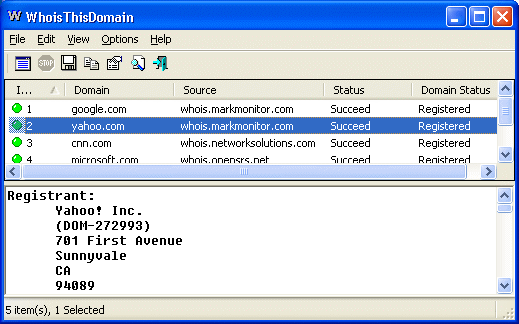
In the example above, you can see the domain registration of Yahoo.
System Requirements
- Windows operating system: Any version of Windows, from Windows 2000 and up to Windows 11.
- Internet connection.
- On a firewall, you should allow outgoing connections to port 43.
Search for other utilities in NirSoft
Versions History
- Version 2.46
- Fixed the Ctrl+A (select all) to work properly on the 'Build Domains List' window.
- Version 2.45
- Added 'Name Servers' column.
- Fixed issue: When a secondary WHOIS server doesn't exist or doesn't respond, WhoisThisDomain now displays the WHOIS result from the first server (In prevoius versions, WhoisThisDomain was struck in a loop, trying to retreive the WHOIS data again and again...)
- Version 2.42
- Updated the WHOIS server of .mx domains.
- Version 2.41
- Updated the WHOIS server of .in domains.
- Version 2.40
- Added 'Registrar URL' column.
- Version 2.38
- Added support for more privacy services ('Private Registration' column)
- Version 2.37
- Fixed bug: WhoisThisDomain failed to remember the last size/position of the main window if it was not located in the primary monitor.
- Version 2.36
- Fixed bug: The support of IDN domains (Internationalized domain name) stopped working in version 2.27
- Fixed bug: The support of domain information in UTF-8 stopped working in version 2.27
- Fixed to work with .de domains that contain German umlauts.
- Version 2.35
- Added support for whois-server-list.xml - You can now download the whois servers list xml (whois-server-list.xml) from https://github.com/whois-server-list/whois-server-list ,
put it in the same folder of WhoisTD.exe (as whois-server-list.xml file) and WhoisThisDomain will automatically extract the right whois server from this file.
- Fixed the whois server of .online domains.
- Version 2.33
- Added new option: 'Send only a single request - Don't send WHOIS request to secondary server'.
- Version 2.32
- Fixed the lower pane to switch focus when pressing tab key.
- Added support for .swiss domains.
- Version 2.31
- Fixed issue: When WHOIS server responses with empty result, WhoisThisDomain now considers it as 'failed' status and it tries to the send the WHOIS request again. (In previous versions, empty results were detected as succeeded WHOIS queries)
- Added support for .global and .website domains.
- Version 2.30
- Added new columns: Email Address, Phone Number, and Country. Be aware that the email/phone/country fields are not detected in all WHOIS servers.
- Version 2.28
- Added support for .ky domains.
- Version 2.27
- Fixed the domains text-box in 'Choose Domains' window to handle Ctrl+A (Select All).
- Version 2.26
- Added the WHOIS servers of .top, .wang , .swiss , .cloud domains.
- Version 2.25
- Added the WHOIS servers of .ai, .aw, .gi, .gg, .mo, .ml, .cf, .mz, .ec, .bo, .na, .nc, .rs domains, and more...
- Version 2.23
- Added the whois servers of .hiphop, .pics, and .community domains.
- Version 2.22
- Fixed bug: WhoisThisDomain failed to retrieve properly the WHOIS information of centralnic.com domains (gb.com and others).
- Version 2.21
- Added support for .im domains.
- Version 2.20
- Added support for SOCKS4 and SOCKS5 proxy (Options -> Proxy Settings). Be aware that user/password authentication is currently not supported.
- Version 2.13
- Added support for .eus domains.
- Version 2.12
- Added support for .london domains.
- Version 2.11
- Fixed to display full information for .name domains.
- Version 2.10
- Added support for Donuts domains ( .email, .company, .support , and many others...)
- Version 2.09
- Added the WHOIS server of .ac.uk domains.
- Version 2.08
- Added 'Show Choose Domains Windows On Start' option. You can turn off this option if you don't want that the
'Choose Domains' window will be opened every time that you start WhoisThisDomain.
- Version 2.07
- Added the WHOIS server of .id domains.
- Version 2.06
- WhoisThisDomain now detects more domain privacy services.
- Version 2.05
- Added /domainslist command-line option.
- Version 2.01
- Fixed the WHOIS server of .cl domains.
- Version 2.00
- Updated the WHOIS servers of .hr, .es, .by, and .tn domains.
- Added option to save the selected items to comma-delimited file.
- Added 'Add Header Line To CSV/Tab-Delimited File' option. When this option is turned on, the column names are added as the first line when you export to csv or tab-delimited file.
- Version 1.98
- The 'Build Domains List' window now remembers the last strings you typed (They are saved in the config file)
- Version 1.97
- Added the WHOIS server of .pw and .so domains.
- Version 1.96
- Added the WHOIS server of .ax domains.
- Version 1.95
- Added support for
br.com, cn.com, eu.com, hu.com, no.com, gb.com, gb.net, qc.com, sa.com, se.com, se.net, us.com, uy.com, za.com, uk.com, and uk.net domains.
- Version 1.91
- Fixed bug: WhoisThisDomain failed to get the correct registrar whois server for .ws domains.
- Version 1.90
- Added new option: "Use xx.whois-servers.net to get the correct WHOIS server instead of the internal servers list".
If this option is turned on, WhoisThisDomain gets the correct WHOIS server by using the whois-servers.net domain. For example,
if you request to get the WHOIS information of .net domain, then WhoisThisDomain uses the net.whois-servers.net address, which points to the IP address of the correct
WHOIS server for .net domains.
- Version 1.87
- Updated WhoisThisDomain to parse the dates of .fi domains.
- Version 1.86
- Add support for expire/last update dates on .co.nz domains.
- Added --show-handles parameter for .dk domains to show handle information.
- Fixed issue: The properties and the other windows opened in the wrong monitor, on multi-monitors system.
- Version 1.85
- Added the WHOIS servers of .ke and .io domains.
- Fixed issue: .ie domains that are not registered displayed by WhoisThisDomain as registered domains.
- Version 1.82
- Updated WhoisThisDomain to parse the dates of Whois.domainsatcost.ca and Whois.Namescout.com servers.
- Version 1.81
- Fixed bug: .be domains displayed as available even if the domain was registered.
- Version 1.80
- Fixed the WHOIS server of .ru and .su domains.
- Version 1.77
- WhoisThisDomain now detects the dates of .ca , co.uk , and .hk domains.
- Version 1.76
- WhoisThisDomain now detects the dates of .ee domains.
- Version 1.75
- Added /domainsfile command-line option, which allows you to easily load the domains list from a simple
text file (Ascii, Unicode, or UTF8), for exmaple:
WhoisTD.exe /domainsfile "c:\temp\domains.txt"
- Version 1.73
- WhoisThisDomain now detects the 'Expires On' date of .ie domains, the last update date of .ir domains
and the update/expire dates of .it domains.
- Version 1.72
- Added the WHOIS server of .ng domains.
- Version 1.71
- Updated the WHOIS servers of .ee and .sm domains, and
added the WHOIS servers of .xxx and .aero domains.
- Version 1.70
- Added 'Registered To' column, which displays the owner of the domain, and
'Private Registration' column, which displays 'Yes' if this domain is protected with privacy service.
- Version 1.66
- Fixed the whois server for .fo, .gl, .gs, .hu, .dz, and .ua domains.
- Version 1.65
- WhoisThisDomain now detects the Created Date for .dk, .cn, and .ru domains.
- Version 1.63
- Fixed the .ae WHOIS server.
- Version 1.62
- Added support for .co domains.
- WhoisThisDomain now detects 'Registered On' line (like in co.uk domains) and display this date in the
'Created On' column.
- Version 1.61
- WhoisThisDomain now detects 'Renewal date' line (like in co.uk domains) and display this date in the
'Expires On' column.
- Version 1.60
- Added support for IDN domains (Internationalized domain name).
When you type a domain name with non-English characters, WhoisThisDomain
automatically converts it to its Ascii form and then submit it to the WHOIS server.
This feature requires Windows XP/SP2 or later.
- Version 1.55
- Added support for WHOIS servers that returns the result in Unicode (UTF-8), like in .cn and .hk domains.
Be aware that this change may cause some problems with other WHOIS servers.
If you encounter any new problem that wasn't exist in the previous version, please report about that.
Also, because of the new Unicode support, WhoisThisDomain may not work properly under
Windows 98. If you're still using Windows 98, you can download v1.52 from here
- Version 1.52
- Added support for .tz domains.
- Version 1.51
- Fixed bug: WhoisThisDomain always displayed .at domain as registered.
- Version 1.50
- Fixed bug for .info and .org domains: When 'Remove Top Whois Lines' option was turned on,
a few significant lines in the top were missing.
- WhoisThisDomain now detect the expire/update/created dates for .info, .org, and .biz domains.
- Version 1.47 - Fixed the WHOIS server for .tw domains and added WHOIS server for .asia domains.
- Version 1.46 - Fixed bug in the new 'pause' feature: If you set the 'pause' to more than 20
seconds, WhoisThisDomain displayed the last domain as 'Failed' and continue to the next one.
- Version 1.45 - Added 'pause' option, which allows you to pause the domains retrieval after xx domains,
so you won't be blocked by the WHOIS servers.
- Version 1.41 - Added support for .pr domains.
- Version 1.40 - Added 3 columns: 'Expires On', 'Created On', and 'Last Updated On'.
These columns are filled only for domains in major .net/.com Registrars (GoDaddy, Network Solutions, and so on).
- Version 1.34 - Fixed the whois server of .ms domains.
- Version 1.33 - Updated the whois servers for .is, .lt, .ma, .md, .pl, .si, and .sk domains.
- Version 1.32 - Added/Updated the whois servers for .in, .ie, .me, .tel, and co.nl domains.
- Version 1.31 - Fixed bug: Wrong domain status displayed for .ca and .it domains.
- Version 1.30 - Fixed the whois servers for .at, .be, .bg, .cz, and others.
- Version 1.29 - Fixed bug: The size of domains text-box was limited to 32 KB.
- Version 1.28 - The whois servers file now allows you to specify more than one server for country-code level domains.
(For example: one server for .uk domains and the other server for gov.uk domains)
- Version 1.27 - Fixed the problem WHOIS server of .ro domains and fixed the WHOIS server of .cn domains.
- Version 1.26 - Fixed the WHOIS server of .jp domains to whois.jprs.jp
- Version 1.25 - The splitter location is now saved to cfg file.
- Version 1.24 - Fixed bug: The main window lost the focus when the user switched to another application and then returned back to WhoisThisDomain.
- Version 1.23 - The configuration is now saved to a file, instead of the Registry.
- Version 1.22 - Fixed bug: free .eu domains displayed as registered.
- Version 1.21 - Updated the WHOIS server for .com and .net domains (to whois.verisign-grs.com) and for .org domain (to whois.pir.org)
- Version 1.20
- Added 'Build Domains List' option.
- Added support for external WHOIS servers list - whois-servers.txt
- Fixed bug: .biz and other domains detected as registered even when they are available.
- Fixed the WHOIS server for .il domains
- Version 1.12 - Fixed the WHOIS server for .tr domains. Fixed bug: available .de domains displayed as regsitered.
- Version 1.11 - Added support for .coop domains.
- Version 1.10 - Added support for the following domains: .ws, .vc, .uy, .uz, .tp. .tk, .tl, .sa, .sb, .sc, .pro, .nf, .mc, .mu, .la, .ly, .ir, .hm, .hn, .gl, .dm, .cd, .bz, .bj, .bi, .ae, .ag, .my, .mobi., .travel
- Version 1.09 - Added support for .my domains, and changed the .nl WHOIS server to the new one.
- Version 1.08 - Added support for .nz domains.
- Version 1.07 - Fixed the WHOIS servers for .mx and .br domains
- Version 1.06 - Fixed the WHOIS server for .ve domains.
- Version 1.05 - Fixed the WHOIS server for .pt domains.
- Version 1.04 - Added support for .eu domains.
- Version 1.03 - Added support for .tv domains.
- Version 1.02 - Fixed the problem with French domains.
- Version 1.01 - Fixed the problem with German domains.
- Version 1.00 - First Release.
Using WhoisThisDomain
This utility doesn't require any installation process or additional DLLs.
Just put the executable file (WhoisTD.exe) anywhere you like, and run it.
When running WhoisThisDomain utility, the "Choose Domains" window appears.
You can type a single domain, or multiple domains separated by commas, space characters, or enter characters.
After pressing the 'OK' button, WhoisThisDomain start to retrieve the domain registration records for the domains that you typed.
Creating whois-servers.txt
Starting from version 1.20, you can create your own WHOIS servers list to override the default
servers defined by WhoisThisDomain.
In order to use this feature, follow the instructions below:
- Create a file named 'whois-servers.txt' in the same folder of WhoisTD.exe
- Add the needed servers to the list. Each line should contain the domain extension, a space
character, and then the whois server address. For example:
gov whois.nic.gov
com rs.internic.net
il whois.isoc.org.il
ir whois.nic.ir
- In the next time that you run WhoisThisDomain, the specified servers will be used instead of the
default servers list stored in WhoisThisDomain.
Be aware that WhoisThisDomain only supports WHOIS servers in port 43. It doesn't support Web-based WHOIS requests.
Using whois-server-list.xml
Starting from version 2.35, you can download the whois servers list xml file from https://github.com/whois-server-list/whois-server-list,
put the file as whois-server-list.xml in the same folder of WhoisTD.exe and WhoisThisDomain will automatically extract the right whois server from this file.
This whois-server-list.xml file is more updated and contains more whois servers than the internal whois servers list of WhoisThisDomain.
Build Domains List Option
If you want to check multiple domain names in combinations with multiple domain extensions, this
feature can help you.
For example, if you want to check abcde, poiuyt, lkjhgf names with .com, .org, .net, .biz extensions,
simply type the names list in the first text-box, and the extensions list in the second one.
After you click OK, you'll get the list of all possible combinations (abcde.com, abcde.org, abcde.net, and so on...)
Command-Line Options
|
/domainsfile <Filename>
|
Load all domains in the specified text file and start to get the WHOIS information for them without
pressing any button or key. The text file can be in Ascii, Unicode, or UTF8 (with byte order mark)
For example:
WhoisTD.exe /domainsfile "c:\temp\domainslist.txt"
| |
/domainslist <Domains List>
|
Load the specified domains and start to get the WHOIS information for them without
pressing any button or key.
For example:
WhoisTD.exe /domainslist "yahoo.com google.com youtube.com"
|
Translating WhoisThisDomain to other languages
WhoisThisDomain allows you to easily translate all menus, dialog-boxes, and other strings
to other languages.
In order to do that, follow the instructions below:
- Run WhoisThisDomain with /savelangfile parameter:
WhoisTD.exe /savelangfile
A file named WhoisTD_lng.ini will be created in the folder of WhoisThisDomain utility.
- Open the created language file in Notepad or in any other text editor.
- Translate all menus, dialog-boxes, and string entries to the desired language.
Optionally, you can also add your name and/or a link to your Web site. (TranslatorName and TranslatorURL values)
If you add this information, it'll be used in the 'About' window.
- After you finish the translation, Run WhoisThisDomain, and all translated
strings will be loaded from the language file.
If you want to run WhoisThisDomain without the translation, simply rename the language file, or move
it to another folder.
License
This utility is released as freeware.
You are allowed to freely distribute this utility via floppy disk, CD-ROM,
Internet, or in any other way, as long as you don't charge anything for this.
If you distribute this utility, you must include all files in
the distribution package, without any modification !
Disclaimer
The software is provided "AS IS" without any warranty, either expressed or implied,
including, but not limited to, the implied warranties of merchantability and fitness
for a particular purpose. The author will not be liable for any special, incidental,
consequential or indirect damages due to loss of data or any other reason.
Feedback
If you have any problem, suggestion, comment, or you found a bug in my utility,
you can send a message to nirsofer@yahoo.com
WhoisThisDomain is also available in other languages. In order to change the language of
WhoisThisDomain, download the appropriate language zip file, extract the 'whoistd_lng.ini',
and put it in the same folder that you Installed WhoisThisDomain utility.
|
|